
Disclosure: As an Amazon Associate, Sony Camera Central earns from qualifying purchases. This post contains affiliate links — we may earn a commission at no extra cost to you.
The Shure MVX2U is a compact XLR-to-USB adapter that solves a specific problem: you have an XLR microphone (or want one) and need to connect it to a computer for recording. No audio interface required, no rack gear, no complicated routing. Just a 1m USB-C cable, a female XLR input, and a direct digital path to your DAW or recording software.
For Sony camera users who shoot video and also do podcasting, voiceover, or streaming from a desk setup, this is worth understanding. The MVX2U bridges the gap between your professional XLR microphone investment and a clean computer recording chain.
March 2026 update: Shure released the MVX2U Gen 2 on March 3, 2026, which adds native iOS/Android support. The Gen 1 review below has been updated to reflect the discontinued ShurePlus app, platform compatibility issues with Apple Silicon Macs, and hardware preamp limitations.
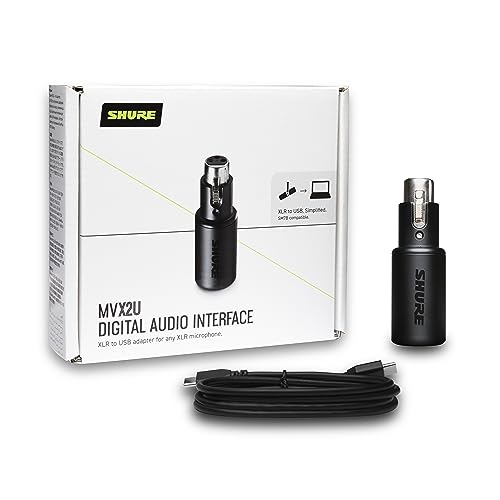
Key Features
| Feature | Shure MVX2U (Gen 1) |
| Connection (Input) | XLR (female) |
| Connection (Output) | USB-C (comes with 1m cable) |
| Phantom Power | 48V (always on — no hardware disable) |
| Preamp Gain | Up to 60dB |
| Monitoring | Zero-latency headphone output (3.5mm) |
| Control Software | MOTIV Mix Desktop App (Windows only — not compatible with Apple Silicon Macs) |
| Compatibility | Mac (Intel only), Windows, iPad Pro (USB-C) |
| Mobile (iOS/Android) | Not officially supported — see Gen 2 below |
| Weight | 100g (3.5 oz) |
The 60dB Gain Range: What Works and What Doesn’t
Most USB audio interfaces provide 40-55dB of gain. The Shure SM7B — one of the most popular broadcast dynamic microphones — requires substantial gain to produce a clean signal at normal speaking distances. Many interfaces leave you near maximum gain, which introduces preamp noise.
The MVX2U’s 60dB gain range handles the SM7B cleanly. Paired with the SM7B (which I’ve used this combination with extensively), you get usable gain headroom without significant preamp noise. The signal is full and broadcast-ready for that pairing specifically.
Important caveat: The 20-50Hz noise floor bug. Reviewers and users conducting detailed audio testing have documented a hardware flaw in the Gen 1 MVX2U: any frequency information in the 20-50Hz range causes the preamp’s noise floor to spike significantly. This is reproducible and confirmed by multiple independent testers. For most voice recording (human voice sits between 80Hz-8kHz), this low-frequency noise is largely inaudible or easily filtered with a high-pass filter. However, if you’re recording acoustic instruments with significant sub-bass content, this is a real limitation. The high-pass filter in the MOTIV app (when available — see below) helps mitigate this, but doesn’t fully eliminate it.
Additionally, the preamp struggles with extremely low-sensitivity microphones (output sensitivity below -56dBV/Pa). If you’re using a ribbon microphone or a very low-output dynamic, you may experience elevated noise. The SM7B pairs well; lower-output mics may not.
Zero-Latency Monitoring
The 3.5mm headphone output provides hardware-level zero-latency monitoring — you hear yourself in real time, not after the audio has been processed through your computer. This matters significantly for voiceover and podcast recording, where even 10ms of latency in software monitoring creates an unnatural delay that disrupts your performance. With the MVX2U, monitoring is direct from the analog circuit, so it’s instant.
Volume on the headphone output is controlled independently of the recording level, so you can set comfortable monitoring volume without affecting what’s captured.
48V Phantom Power
The MVX2U supplies standard 48V phantom power, enabling condenser microphones in addition to dynamic mics. This means it works with studio condensers like the Audio-Technica AT2020, Rode NT1, or virtually any condenser mic with an XLR output.
Critical warning for ribbon microphone users: The 48V phantom power is always on — there is no hardware switch to disable it. Without the MOTIV app (which doesn’t work on Apple Silicon Macs — see below), you cannot disable phantom power in software either. Phantom power can permanently damage ribbon microphones. If you use ribbon mics, the Gen 1 MVX2U is not appropriate for your setup without a functional control app.
The MOTIV App: Software Control (Updated March 2026)
The original ShurePlus app has been discontinued. Shure now provides three replacement applications for controlling the MVX2U’s digital signal processing (DSP):
- MOTIV Mix Desktop App — controls EQ (3-band), compression, limiter, and high-pass filter. This replaces ShurePlus for desktop DSP control.
- MOTIV Audio App — for recording audio directly on compatible mobile devices.
- MOTIV Video App — for recording video + audio on compatible mobile devices.
Apple Silicon Mac incompatibility — major issue: The MOTIV Mix Desktop App’s official release notes explicitly state it is “Not recommended for ARM-based PCs.” This means M1, M2, M3, and M4 Mac users cannot reliably use the MOTIV app to control the MVX2U’s DSP features. Since the device defaults to 48V phantom power on with no hardware disable, and lacks any hardware gain knob, Mac users on Apple Silicon face a device that is difficult to control and potentially dangerous to ribbon microphones. If you’re on an Apple Silicon Mac, the MVX2U Gen 1 is not recommended — consider the Gen 2 (which resolves this) or a proper USB audio interface.
The DSP features themselves are genuinely useful when accessible: the high-pass filter removes low-end rumble from room noise, the EQ can add presence or warmth, and the limiter prevents clipping. These are non-destructive settings that affect what’s sent to the computer but not the monitoring signal.
MVX2U Gen 2 (March 2026 Update)
On March 3, 2026, Shure released the MVX2U Gen 2 at $139 (Gen 1 retails around $100). The Gen 2 addresses the two main limitations of the original:
- Native iOS and Android support: The Gen 1 explicitly did not support mobile. The Gen 2 adds native compatibility for iPhone and Android phones, enabling direct field recording without a computer.
- Improved DAC and lower noise floor: The Gen 2 features an upgraded digital-to-analog converter and improved preamp noise performance — addressing the preamp limitations found in the original.
- Better Mac compatibility: Shure has updated the MOTIV software stack for the Gen 2 to support modern Mac systems.
If you’re buying new and the $39 premium isn’t a barrier, the Gen 2 is the version to buy. If you’re considering a used Gen 1, factor in the Apple Silicon incompatibility and phantom power risks before purchasing.
When the MVX2U Makes Sense vs. Alternatives
| Solution | Cost | Best For | Limitation |
| Shure MVX2U (Gen 1) | ~$100 | Single XLR mic → Windows PC, simple chain | Apple Silicon Mac incompatible, no mobile support, 20-50Hz noise bug |
| Shure MVX2U (Gen 2) | ~$139 | Single XLR mic → computer or mobile | Single XLR input only |
| Cloudlifter + USB Interface (e.g., Focusrite Scarlett Solo) | ~$200+ | Maximum gain for demanding dynamic mics, hardware control | More components, more complex setup |
| Rodecaster Pro II | ~$700 | Full podcast production (4 XLR, USB, Bluetooth, sound pads) | Expensive overkill for simple setups |
| Rode AI-Micro | ~$80 | Two mics directly to phone/computer, TRS/TRRS | No phantom power, less gain than MVX2U |
Using the Shure MVX2U With Sony Cameras
For Sony camera users, the typical use case is a desk recording setup separate from the camera. You shoot video with the camera using a wireless mic or camera-mounted microphone, and you use the MVX2U + XLR mic for podcasts, streaming, or voiceover that’s recorded directly to the computer.
One workflow that works well: record video on your Sony camera using a wireless mic system (like the Sony ECM-W2BT or Rode Wireless GO II), and simultaneously record your full-quality audio through the MVX2U to a computer running Audacity, GarageBand, or your DAW. In post, sync the two audio tracks — the camera audio is your rough guide; the MVX2U recording is what you actually use.
Pros and Cons
| Pros | Cons |
| 60dB gain — handles SM7B and other demanding dynamics | Single XLR input only |
| 48V phantom power for condenser mics | 48V always on — no hardware disable (danger for ribbon mics) |
| Zero-latency monitoring built in | MOTIV app incompatible with Apple Silicon Macs |
| Compact — much smaller than a dedicated interface | 20-50Hz hardware noise bug with low-sensitivity mics |
| MOTIV apps add EQ, compression, limiting (Windows/Intel Mac) | No hardware gain knob — software control only |
| Shure build quality, reliable performance | Gen 2 needed for iOS/Android support |
Verdict
The Shure MVX2U Gen 1 remains a good option for Windows PC users who need a single XLR input connected cleanly to a computer. The 60dB gain range handles demanding dynamic microphones, zero-latency monitoring is genuinely useful, and the compact form factor is unmatched. The MOTIV app ecosystem works well on Windows.
However, the Gen 1 is not appropriate for Apple Silicon Mac users (MOTIV app incompatible, phantom power can’t be disabled in hardware), and should be avoided by ribbon microphone users for the same reason. If you’re buying new, the $39 premium for the Gen 2 is worth it — it fixes the mobile limitation, improves the preamp, and resolves the Mac compatibility issues.

Frequently Asked Questions
Does the Shure MVX2U work on Mac?
The Gen 1 works as a basic USB audio device on any Mac — audio will pass through. However, the MOTIV Mix Desktop App (required for DSP control, EQ, and disabling features) is not compatible with Apple Silicon (M1/M2/M3/M4) Macs. Without app access, you can’t use EQ, compression, or the limiter. The Gen 2 (released March 2026) resolves this compatibility issue.
Can I use the Shure MVX2U with my phone?
The Gen 1 does not officially support iOS or Android. It works with iPad Pro via USB-C in some configurations, but Shure did not recommend connecting the Gen 1 to Android phones. The Gen 2 (March 2026, $139) adds native iOS and Android support specifically to address this limitation.
What replaced the ShurePlus app?
The ShurePlus MOTIV Desktop app has been discontinued. It’s been replaced by three apps: MOTIV Mix Desktop App (for DSP control on desktop), MOTIV Audio App (mobile audio recording), and MOTIV Video App (mobile video + audio recording). The MOTIV Mix Desktop App is the direct replacement for desktop DSP control, but it’s not compatible with Apple Silicon Macs.
Is the Shure MVX2U Gen 2 worth the upgrade?
If you’re a new buyer: yes, get the Gen 2. The $39 premium adds iOS/Android support, improves the preamp and noise floor, and resolves Mac compatibility issues. If you’re a current Gen 1 owner on Windows without these pain points, the upgrade is optional — the Gen 1 remains functional for its intended use case.