Last updated: July 2026
By Sony Camera Central Editorial
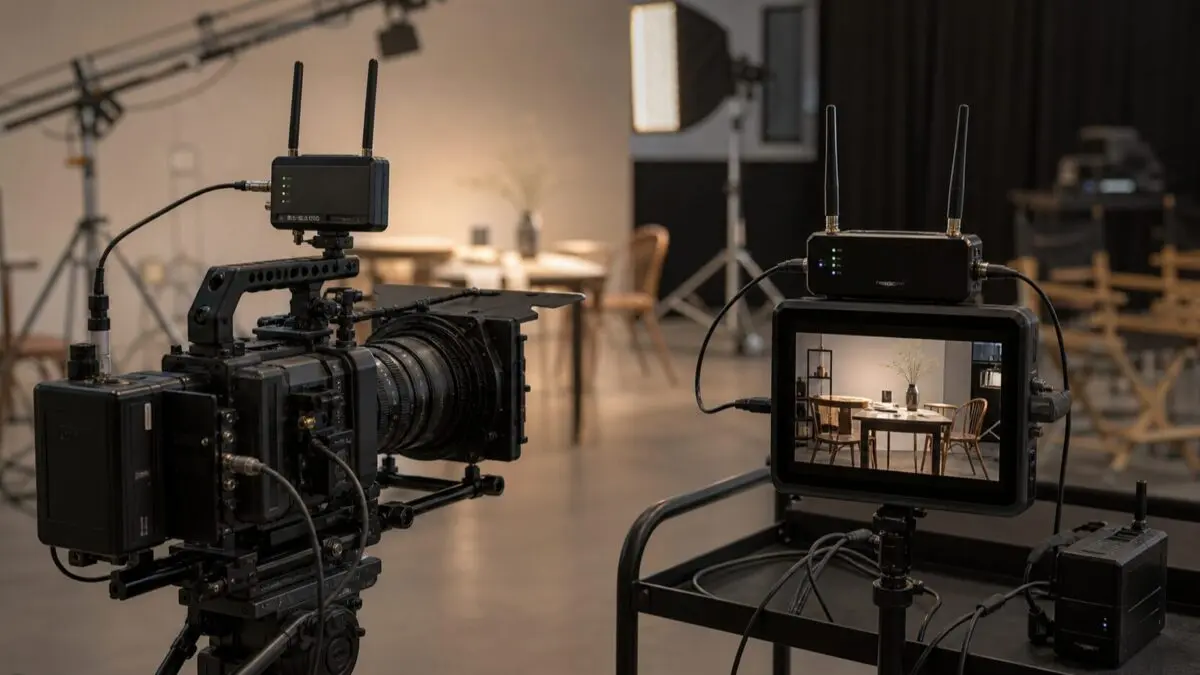
A dependable director’s monitor feed starts with a clear signal path, not the longest advertised wireless range. For a Sony FX6, decide who needs to see the image, where they will stand, and whether the feed is for framing or a timing-critical task; then choose a transmitter, receiver, monitor, power plan, and backup that match that job.
Key Takeaways
- A wireless monitor feed is a convenience layer; the camera operator should keep a reliable primary viewing path.
- Choose the camera output and connector path before comparing wireless-system features.
- More viewers, more walls, and busier locations all make a simple transmitter-to-one-monitor setup less predictable.
- A short cable, charged batteries, and a monitoring fallback are part of the system, not afterthoughts.
How do you send a Sony FX6 feed to a director’s monitor?
Connect the FX6 output that matches the transmitter, pair it with a receiver at the director’s monitor, and confirm the monitor sees the intended framing and overlays before the take. The FX6 provides both SDI and HDMI outputs, but the transmitter, receiver, monitor, cables, and any adapters still need to be compatible as one path.
Start by deciding whether the director needs a clean image, camera overlays, or a particular display treatment. Those choices affect camera output configuration and should be confirmed before attaching hardware. On a controlled setup, a direct cable check between the camera and monitor is a useful first step: it separates an output-setting problem from a wireless-link problem.
What should you decide before choosing a wireless video system?
The important choice is the workflow, not a single headline specification. A one-person interview setup, a client monitor across a room, and a multi-viewer commercial set create different demands.
- Connection path: Verify the camera output, transmitter input, receiver output, and monitor input can be connected without improvising adapters.
- Viewer count: Identify whether one receiver is enough or whether the production needs additional viewing positions.
- Location conditions: Treat walls, distance, other wireless devices, and physical obstructions as planning variables rather than surprises.
- Power: Confirm how long the camera, transmitter, receiver, and monitor must operate and who is responsible for swaps.
How can you reduce dropped feeds and set-day confusion?
Reduce failures by testing the exact kit together before people are waiting on the feed. A system that pairs on a desk can still need repositioning once a monitor, a camera cage, a crew, and the location are involved.
Use a short preflight: turn on every component, verify the correct camera output, check framing and overlays, walk the intended monitoring path, and identify the wired fallback. Labeling batteries and cables also prevents a receiver-power problem from looking like a transmission problem.
When is wireless monitoring the wrong tool?
Wireless monitoring is the wrong tool when the job requires an uncompromised primary viewing path or when the connection adds complexity without solving a real communication problem. For a short, close, static setup, a cable can be simpler to diagnose and easier to keep powered.
It is also worth separating monitoring from recording. A director’s feed helps people make creative decisions; it does not replace a plan for recording media, audio, exposure, or camera backup. Build the monitoring layer after the core capture workflow is stable.
FAQ
Can a director use a tablet as the monitor?
Possibly, but validate the exact workflow before a shoot. A tablet-based feed may suit casual viewing, while a dedicated receiver and monitor can be a better fit when framing, brightness, or dependable connection matters.
Should the operator judge focus from the director’s feed?
No. Treat the operator’s primary monitoring path as the place for critical camera decisions unless the production has explicitly tested another arrangement.
What should be packed as a backup?
Bring the cable and connector path that can connect the camera to the intended monitor directly, plus known-good power and spare media for the monitoring components.
Disclosure: Sony Camera Central may earn a commission from qualifying purchases made through links on the next page, at no additional cost to you.
Ready to compare compatible options? See our Best Wireless Video Systems for Sony FX3 & FX6 guide.